
Updated September 17, 2026
For solo remote work, the Roma Norte loft combines 200 Mbps fiber with an operated rate of $23,000–$33,000 MXN per month. If two people need separate rooms for simultaneous calls, the Narvarte two-bedroom carries a $32,000–$45,000 MXN monthly planning band. Both options arrive furnished with the practical setup handled; book direct to compare live availability for your dates.
What 200 Mbps actually survives
Speed numbers only mean something attached to a task. On the Roma Norte fiber line:
- A four-person video call while someone else streams — fine
- Pushing a 2 GB build or video file mid-afternoon — minutes, not the whole lunch break
- Screen sharing at full resolution without the apologetic “can you see my screen?” — fine
- Two people on separate calls in a two-bedroom — this is the Narvarte case, and why the 2BR exists
For reference, the Roma Norte cafés remote workers actually use run 30–80 Mbps on shared Wi-Fi. The apartment is not a small upgrade on that. It is a different category.
The part most listings never mention: when it drops
Internet in Mexico City is good and occasionally it is not. A monthly stay is long enough that this will happen to you at least once, so the plan matters more than the marketing number:
- Tether to a Mexican eSIM. Get one in your first week — Telcel LTE covers Roma Norte and Narvarte properly. A monthly data pack costs a few hundred pesos and turns an outage into an inconvenience. Our CDMX SIM card guide walks through it.
- Walk to a café. Twenty minutes of degraded Wi-Fi beats a missed call.
- Buy a coworking day pass. See the CDMX coworking price comparison for what a drop-in actually costs.
Message us while you are doing step one and we chase the provider in parallel.
What a monthly apartment in Mexico City with reliable internet costs
The connection is usually the cheapest part of the month — the mistake is treating it as free and then paying for the failure. Here is the realistic budget for a solo remote worker who books the connectivity solved instead of improvising it, in MXN:
| Line item | Monthly cost (MXN) | Notes |
|---|---|---|
| Roma Norte loft, 200 Mbps fiber included | $23,000–$33,000 | Operated band; moves with season and length |
| Narvarte 2BR, fiber-class Wi-Fi, two work rooms | $32,000–$45,000 | The two-people-on-calls option |
| Backup eSIM with monthly data pack | $300–$500 | Telcel LTE; turns an outage into an inconvenience |
| Coworking day passes, used occasionally | $0–$1,500 | $150–$350 MXN per drop-in day |
| Café working sessions | $500–$1,000 | A coffee and a pastry buys the table |
Two readings of that table matter. First, the entire backup stack — eSIM, occasional coworking, café sessions — costs less per month than a single missed client day. Second, the gap between the loft and the 2BR is not an internet gap; it is a rooms gap, and if two people take calls simultaneously the second room outperforms any speed upgrade.
Improvising instead has its own price: a hotel with “business Wi-Fi” at a comparable monthly total will not publish a speed, and a cheap lease means 2–6 weeks waiting on a fiber installation appointment — fine for a year, absurd for a month.
Neighborhood internet, honestly compared
Fiber reached central Mexico City years ago, so the neighborhood question is less “who has fiber” and more “what does daily life look like around the desk”:
- Roma Norte has mature fiber, the deepest café-backup bench in the city, and the highest rent on this list. It suits people who leave the apartment between calls.
- Narvarte matches Roma Norte’s infrastructure at lower rent, with quieter blocks that make open-window calls feasible. The Narvarte remote workers guide maps its cafés and coworking options.
- Del Valle, one step further south, has the same fiber providers and even fewer tourists; the Del Valle monthly cost and routine breakdown shows what a working month there costs line by line.
If you have not fixed a neighborhood yet, the 2026 remote-worker neighborhood rankings compare these three against Condesa, Escandón, and San Rafael on exactly the criteria that decide a working month: noise, rent, transit, and where you go when the router blinks red.
One caveat worth repeating: neighborhood averages predict nothing about your specific unit. A gorgeous Condesa building can sit on a saturated node while an unremarkable Narvarte block enjoys a fresh fiber run. The only number that matters is the one measured at the desk you will actually sit at — which is why we answer that question per unit, before payment, instead of pointing at a coverage map.
Which unit fits which job
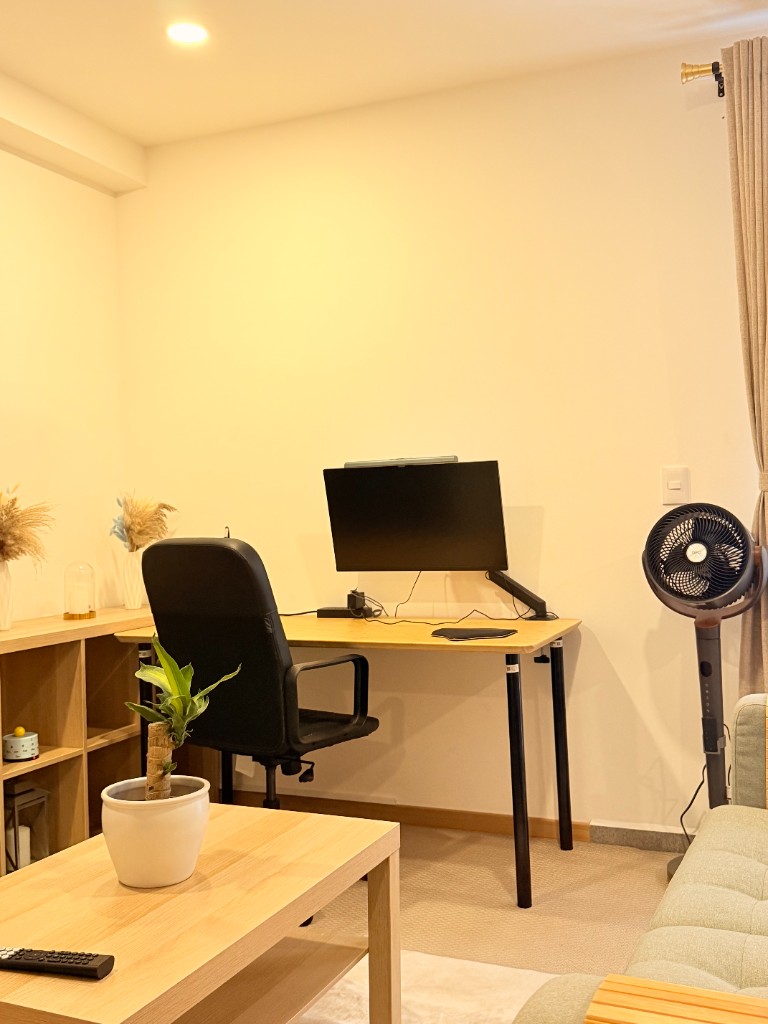
If you are solo and your day is calls and screen-sharing, take the Roma Norte loft — best line, best desk, second monitor already there. If there are two of you working, take the Narvarte two-bedroom : a door between two calls is worth more than 50 extra Mbps.
Still comparing neighborhoods? Start with monthly apartments in Mexico City or where to stay for a monthly stay .
Speed is not the only number your job cares about
Different remote jobs break on different failures, and it is worth knowing which one is yours before you pick a unit:
- Video-call-heavy roles — sales, management, client work — care about stability and upload, not headline download. A line that holds 10 Mbps up without jitter beats a faster line that hiccups twice an hour. Mexico City’s latency to US servers is a quiet advantage here; if your clients are in the US, the timezone-advantage breakdown for working from CDMX explains why calls from here feel local.
- Developers and designers care about sustained throughput for pushes, pulls, and asset syncs. This is where 200 Mbps fiber earns its keep and café Wi-Fi visibly does not.
- Anyone handling confidential material should treat shared networks as off-limits entirely, which turns “the apartment line works” from a comfort into a requirement.
The common thread: a monthly stay gives you time to fix problems a hotel guest just endures. Report a weak evening number in week one and it can be escalated and resolved while the month is still young.
Test it yourself in the first hour
Do this on arrival, before you unpack: run a speed test from the desk — not from the sofa, not from the bedroom doorway — and run a second one at 9 PM, when the whole building is streaming. Two numbers, thirty seconds, and you know what you are working with for the next month instead of discovering it during a client call on day nine.
If the evening number disappoints, tell us that week. A month is long enough for us to escalate with the provider and long enough for it to actually get fixed. Nobody can fix a complaint they receive in the checkout review.
Why “fiber” on a listing means nothing on its own
Fiber to the building is not fiber to your desk. The last few meters — the router’s age, where it sits, how many walls sit between it and you, how many neighbors share the node — decide what you actually get. That is why we publish a speed per unit and will re-test it on request, rather than writing “high-speed Wi-Fi” and hoping.